|
Supported Axes: |
Position Control Axes |
|
Supported Control Modes: |
See the Commands Overview topic for basic command information and how to issue commands from PLCs, HMIs, etc.
Command Parameters
|
# |
Parameter Description |
Range |
|---|---|---|
|
1 |
Offset (position-units) |
any |
|
2 |
Amplitude (position-units) |
>= 0 |
|
3 |
Frequency (Hz) |
0 to 1/4 of the loop frequency |
|
4 |
Rising Fraction (cycle) |
0 – 1.0 |
|
5 |
High Fraction (cycle) |
0 – 1.0 |
|
6 |
Falling Fraction (cycle) |
0 – 1.0 |
|
7 |
Cycles |
0 to 16 million in 0.125 steps (0 = continuous) |
|
8 |
Start Location
|
A valid integer as described |
|
9 |
Status Block (address) Note: See Specifying a Register Address below. |
A valid address or none(0) |
Description
The Trapezoid Start command can be used to create triangle, sawtooth, square, or trapezoid waveforms for position control. For pressure or force control, use the Trapezoid Start (Pressure/Force) (133) command.
The Trapezoid command can be used in conjunction with the Change Target Parameter (80) and Change Trapezoid Shape (132) commands to change the waveform while the trapezoid motion is in progress for dynamic motion requirements such as adaptive amplitude control.
A Trapezoid motion in progress can be stopped with the Trapezoid Stop (131) command.
The Trapezoid Start command generates waveforms that include discontinuities in the Target Velocity and possibly in the Target Position, which typically results in harsh motion that may shock the system. Make sure your system is designed to handle this.
Anatomy of the Trapezoid Waveform
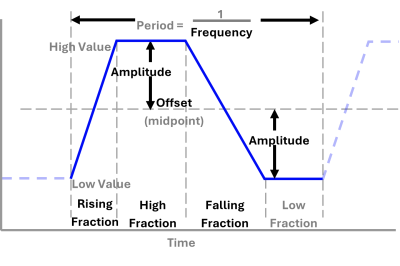
The diagram below illustrates how the trapezoid waveform is defined by the command parameters Offset, Amplitude, Frequency, Rising Fraction, High Fraction, and Falling Fraction.
The High value is the Offset plus the Amplitude. The Low value is the Offset minus the Amplitude.
The fractional sections are each defined as a fraction of the waveform period, for a total period of 1.0. When sending this command, the sum of the Rising Fraction, High Fraction, and Falling Fraction command parameters must be less than or equal to 1.0. The Low Fraction is not specified by the command parameters and is implied by the others. Its fractional value is calculated as 1.0 – (Rising Fraction + High Fraction + Falling Fraction).
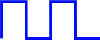
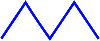
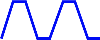
Various waveforms can be created by setting the Rising Fraction, High Fraction, and Falling Fraction command parameters to various values, including zero. Example waveforms are listed below:
|
Waveform |
Shape |
Rising Fraction |
High Fraction |
Falling Fraction |
Low Fraction (implied) |
|---|---|---|---|---|---|
|
50% Duty-Cycle Square Wave |
|
0.0 |
0.5 |
0.0 |
0.5 |
|
Isosceles Triangle Wave |
|
0.5 |
0.0 |
0.5 |
0.0 |
|
Isosceles Trapezoid Wave |
|
0.25 |
0.25 |
0.25 |
0.25 |
|
Sawtooth Wave |
|
1.0 |
0.0 |
0.0 |
0.0 |
Starting Locations
The trapezoid motion can be started at any of the following locations:
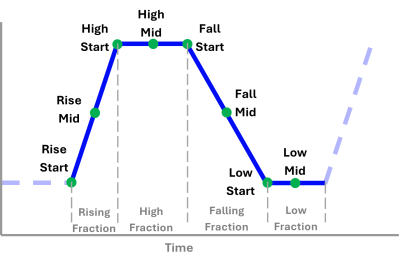
Before sending this command, the Target Position must be at the location specified by the Start Location command parameter, or a Transition Rate (56) command must previously have been sent to specify how the axis should move to get to the trapezoid waveform. A transition command will allow you to start a trapezoid waveform even though the axis is not at the correct starting point.
Commanded Cycles
The Cycles command parameter defines the number of cycles, from 0 to 16 million in increments of 0.125. If the commanded Cycles value is not exactly a multiple of 0.125, it is truncated to be a multiple of 0.125. The Cycles parameter is relative to the specified Starting Location.
A Cycles value of 0 will generate an endless waveform. If the number of cycles is non-zero, the trapezoid move will end after completing the specified number of cycles and will hold that position.
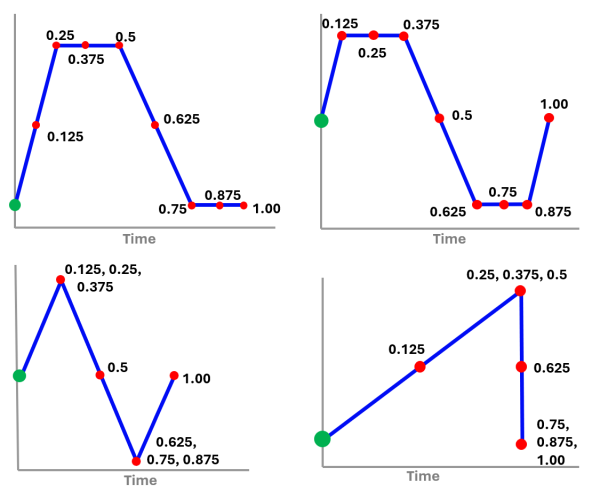
The commanded Cycles increments of 0.125 define partial cycles that correspond to the Fraction sections of the waveform. Each full Rising Fraction, High Fraction, Falling Fraction, and the remaining implied Low Fraction section is counted as two 0.125 increments, with the 0.125 increment denoting half of the section. A Fraction section is counted as two 0.125 increments even if the Fraction command parameter is zero. The 0.125 increments are not defined as an eighth of the time period.
Due to the limits of 32-bit floating point values, in order to preserve precision, the Cycles parameter can be a maximum of 16 million only if it is a whole number. If it contains a half, such a 45.5, it can be a maximum of 7,999,999.5. If it contains a quarter, such a 12.25 or 97.75, it can be a maximum of 3,999,999.75. If it contains an eighth, such as 12.125 or 97.375, it can be a maximum of 1,999,999.875.
Commanded Cycles Examples
The following waveform examples illustrate where the commanded Cycles will end for various fractional values. The waveform starts at the green point. The red points are the ending locations for the given commanded Cycles values. When a Rising, High, Falling, or Low Fraction section is zero, there are multiple Cycles fractions that will result in ending at the same location.
Stopping Trapezoid Motion
If the number of cycles is non-zero, the trapezoid motion will automatically stop after reaching the specified number of cycles and will hold that position.
The Trapezoid Stop (131) command stops a trapezoid motion that is in progress, with various stop location options. See the Trapezoid Stop (131) command for more details.
Feed Forwards
The Acceleration Feed Forward does not apply to the Trapezoid Start motion because the trapezoid only generates instantaneous changes in velocity and the Target Acceleration is set to zero. However, if the Transition Rate is used to get onto the waveform, the Target Acceleration and hence the Acceleration Feed Forward will apply to the transition portion of the motion.
If the Rising Fraction or Falling Fraction is zero, the Velocity Feed Forward will not apply to that section because the Target Velocity will be zero.
Trapezoid Motion Status
Axis Status Registers for Trapezoid Motion
The Cycles Axis Status register gives the whole number of cycles completed for the trapezoid motion in progress. It is listed in Axis Tools, in the Axis Status Registers pane, on the All tab, in the Target section. The Cycles Axis Status register is a DINT.
Status Block
Advanced users may wish to use the Trapezoid Start command's Status Block, which provides read-only information on the waveform motion. This information is most useful when manipulating trapezoid motion in user programs, especially in conjunction with the Change Target Parameter (80) and Trapezoid Change Shape (132) commands.
To use the Status Block, you must specify an address from the Variable Table in the Status Block parameter of the Trapezoid Start command. The Status Block requires ten registers in the Variable Table, beginning with the specified address. As the trapezoid motion progresses, the selected registers in the Variable Table will be continuously updated. The selected variables will not be named automatically; you should give a descriptive name to each to help keep track of them.
To prevent confusion, trapezoid motions that are running simultaneously should not use the same Status Block address. Non-simultaneous trapezoid moves can use the same Status Block address.
The Status Block provides the following information:
|
Offset |
Name |
Data Type |
Description |
|---|---|---|---|
|
0 |
Current Cycle Count |
REAL |
The current number of whole cycles completed. Each cycle begins at the location specified by the Start Location command parameter. The fractional part of the cycle is given by the Current Cycle Fraction (Time-Based) and Current Cycle Fraction (Section-Based) below. For trapezoid motion with a fixed number of cycles, this value will not go beyond the requested cycle count. For continuous trapezoid motion (without a fixed number of cycles), this value will wrap to zero after it reaches 10,000,000 and then continue incrementing. |
|
1 |
Current Cycle Fraction (Time-Based) |
REAL |
The time-based fraction of the current cycle that has been completed. This fractional part is given in this separate register to retain accuracy as the Current Cycle reaches high values. This fraction is not the same as any fractional portion of the Cycles command parameter. |
|
2 |
Current Cycle Fraction (Section-Based) |
REAL |
The fraction of the current cycle completed in terms of Rising, High, Falling, and Low sections, with 0.125 steps for each half-section. |
|
3 |
Current Amplitude |
REAL |
The current amplitude of the trapezoid move in position-units. |
|
4 |
Current Frequency |
REAL |
The current frequency of the trapezoid move in hertz. |
|
5 |
Current Offset |
REAL |
The current offset of the trapezoid move in position-units. |
|
6 |
Current Phase |
REAL |
The current phase (by analogy to a sine wave) of the trapezoid move in degrees. |
|
7 |
Current Rising Fraction |
REAL |
The current rising cycle fraction of the trapezoid move. |
|
8 |
Current High Fraction |
REAL |
The current high cycle fraction of the trapezoid move. |
|
9 |
Current Falling Fraction |
REAL |
The current falling cycle fraction of the trapezoid move. |
Specifying a Register Address
When issuing this command from anywhere other than RMCTools, the addresses in the Status Block command parameter must be entered as an integer value.
RMC addresses are represented in IEC format as:
%MDfile.element, where file = file number, and element = element number.
Use the following equation to convert a register address to integer format, N:
N = file * 4096 + element
Example:
Register address %MD1024.20 is 1024*4096 + 20 = 4194324.
Status Bits
Target Generator Done bit
This bit indicates that the trapezoid motion has completed the specified number of cycles and has reached the ending point. Notice that this bit does not indicate whether the Actual Position has reached the Requested Position. If the Target Generator Done bit is set, and the Actual Position is within the In Position Tolerance window of the Target Position, the In Position Status bit will be set. The In Position bit indicates that the move is complete and the axis is at position.
Target Generator State A and B bits
|
B |
A |
Description |
|---|---|---|
|
0 |
0 |
Reserved |
|
0 |
1 |
Reserved |
|
1 |
0 |
Reserved |
|
1 |
1 |
Reserved |
Pri. TG SI Busy (Primary Target Generator Superimposed Busy) Bit
This bit will be set during the transition. The transition begins when the Trapezoid Start command is issued, not necessarily when the Transition Rate (56) command is issued. When the transition completes, this bit will clear.
See Also
Trapezoid Stop (131) | Trapezoid Change Shape (132) | Trapezoid Start (Prs/Frc) (133) | Change Target Parameter (80)
Copyright © 2026 Delta Computer Systems, Inc. dba Delta Motion