|
Supported Axes: |
Position Control Axes |
|
Supported Control Modes: |
See the Commands Overview topic for basic command information and how to issue commands from PLCs, HMIs, etc.
Command Parameters
|
# |
Parameter Description |
Range |
|---|---|---|
|
1 |
Stop Location
|
A valid integer as described |
Description
The Trapezoid Stop command can be used to stop a position control trapezoid motion that is currently in progress. For pressure or force control, use the Trapezoid Stop (Pressure/Force) (134) command.
The Trapezoid Stop command will stop the Target Position when the Target Position reaches the specified Stop Location.
Stop Location
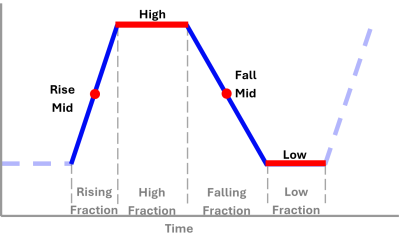
The Stop Location command parameter options are to stop at the Next Cycle, or one of the red positions shown below:
Next Cycle
This is when the current cycle completes, which is when the Cycles Axis Status register reaches a whole number. The location of the cycle completion is relative to the Start Location that was specified in the Trapezoid Start (130) command.
High
The Target Position will stop when the Target reaches the High position of the waveform. If the axis is already at the High position, the axis will remain stopped and the motion will be complete.
Low
The Target Position will stop when the Target reaches the Low position of the waveform. If the axis is already at the Low position, the axis will remain stopped and the motion will be complete.
Next High or Low
The Target Position will stop when the Target reaches the High or Low position of the waveform. If the axis is already at the High or Low position, the axis will remain stopped and the motion will be complete.
Rise Mid
The Target Position will stop when the Target reaches the middle of the Rising Fraction section of the waveform.
Fall Mid
The Target Position will stop when the Target reaches the middle of the Falling Fraction section of the waveform.
Next Rise/Fall Mid
The Target Position will stop when the Target reaches the middle of the Rising or Falling Fraction section of the waveform.
Other methods of stopping a trapezoid motion include the Hold Current Position (5) command, which will abruptly stop the axis by setting the Target Position to the current Actual Position, or the Stop (Closed Loop) (6) command, which will stop the axis using smooth accelerations and velocities.
Status Bits
In Position Bit
After the Target Position stops according to the defined Stop Location, and the Actual Position is within the In Position Tolerance window, the In Position Status bit will be set. This bit indicates that the move is complete and the axis is at position.
Target Generator Bits
The Target Generator bits in the Status Bits register indicate which portion of the move the axis is currently in. These bits are useful when programming complex motion sequences.
Target Generator Done bit
This bit indicates the move is complete, which occurs when the target has stopped at the command Stop Location.
Target Generator State A and B bits
|
B |
A |
Description |
|---|---|---|
|
0 |
0 |
Reserved |
|
0 |
1 |
Reserved |
|
1 |
0 |
Reserved |
|
1 |
1 |
Reserved |
See Also
Trapezoid Start (130) | Trapezoid Change Shape (132) | Trapezoid Stop (Prs/Frc) (134)
Copyright © 2026 Delta Computer Systems, Inc. dba Delta Motion