|
Type: |
|
|
Address: |
RMC75: %MDn.94, where n = 12 + the axis number RMC150: %MDn.94, where n = 24 + the axis number RMC200: %MDn.403, where n = 384 + the axis number |
|
System Tag: |
|
|
How to Find: |
Axes Parameters Pane, All tab: Target |
|
Data Type: |
|
|
Units: |
pu/s3 |
|
Range: |
≥0 |
|
Default Value: |
100000 |
Description
The Requested Jerk parameter is used for point-to-point and velocity closed loop motion commands. The term 'jerk' is the rate of acceleration. The Requested Jerk specifies the requested average Target Jerk. Therefore, the peak Target Jerk will be 1.5 times the Requested Jerk.
The Requested Jerk parameter is used as follows:
Specify the Target Type (RMC75/150 only, firmware 1.50 and newer)
If the Requested Jerk is set to a non-zero number, the target generator will generate speed profiles with s-curves. If the Requested Jerk is set to 0, the target generator will generate trapezoidal target speed profiles. Notice that the value of the jerk doesn't matter when specifying a target type, only non-zero versus zero.
Notice that the RMC200 has a separate
Target Type
parameter for selecting trapezoidal or s-curve speed profiles.
Speed at Position (36) Command
The Requested Jerk
is used in the calculation of the speed at position command when the S-curve
target generator is active.
Short Moves
The Requested Jerk is used in the calculations for point-to-point moves when the following criteria are met:
The target is stopped but not at the final position.
The requested velocity is non-zero (as it usually is unless the user wanted to just stop at the current position).
The distance to move is less than the acceleration distance plus deceleration distance.
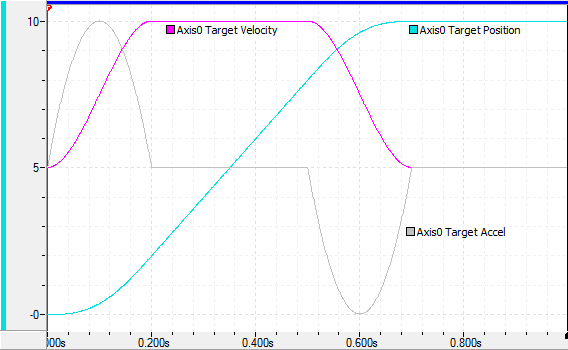
The S-curve profile generates a 5th-order profile for the Target Velocity during the acceleration and deceleration phases, as shown by the magenta line below. This results in a smooth Target Acceleration (gray line), with no sudden jumps. A smooth Target Acceleration will result in a smooth control output contribution by the Acceleration Feed Forward, for optimal control of the axis motion.
With the S-curve target profile, the commanded acceleration specifies the average Target Acceleration. The maximum instantaneous Target Acceleration will be 1.5 times the commanded acceleration.
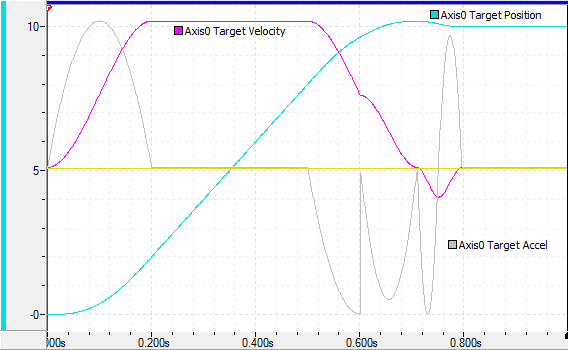
A disadvantage of the RMC's S-curve target profile is that if another motion command is sent to the axis during the deceleration portion of a point-to-point command, the Target Acceleration will be reset to zero before continuing. This will extend the deceleration time and may cause the Target Position to overshoot the requested position, as shown below. If commands are continuously sent to the axis while commands are in progress, Delta recommends using the trapezoidal target profile instead. Notice that if an identical command is sent during the deceleration portion, the RMC will recognize this and not reset the Target Acceleration, and the axis will not overshoot.
Trapezoidal Target Profile
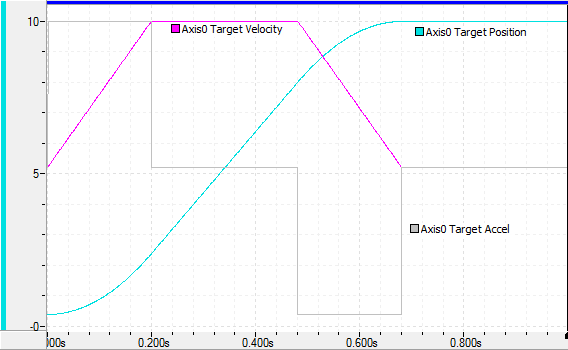
The Trapezoidal profile generates linear segments for the Target Velocity, as shown by the magenta line below. This results in a Target Acceleration (gray line), that suddenly jumps to its requested value. This will result in a sudden jump in the control output contribution by the Acceleration Feed Forward, and may prevent optimal control of the axis motion, especially for highly dynamic systems.
A trapezoidal target profile should be used if commands are continuously sent to the axis while commands are in progress, to prevent the target position from overshooting.
See Also
Target Type | Move Absolute (20)
Copyright © 2026 Delta Computer Systems, Inc. dba Delta Motion