

For 2nd-generation Delta Motion Controllers
RMCWin
Tuning & Diagnostics Program
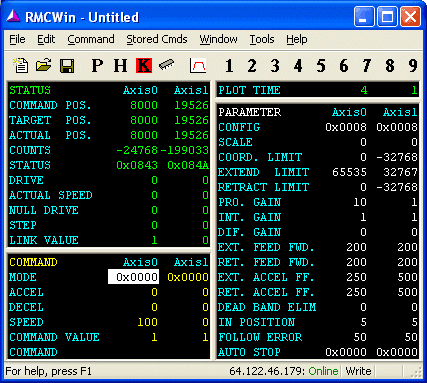
RMCWin is a powerful motion control software package integral to the RMC100 family of motion controllers. It enables you to set up, display, troubleshoot, configure and control all features of Delta's multi-axis RMC100 motion controller, providing an immediate and comprehensive overview of the status and settings of up to 8 axes of motion control. Commands can be issued from the main screen to exercise any of the many features of the RMC100.
RMCWin is included with RMC100 Motion Controllers and offers high speed communications to the RMC100 via Ethernet or a serial cable.
Main Screen
RMCWin provides an immediate and comprehensive overview of the status and current settings of up to 8 axes of motion control. Commands can be issued from the main screen to exercise any of the many features of the RMC100.
RMCWin Plots
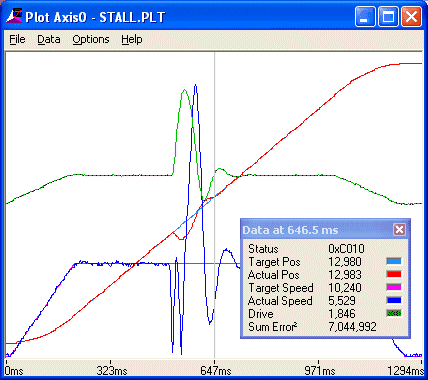
Automatically started by a move or at any time by a simple keystroke, RMCWin displays detailed plots of moves, along with all status and motion parameters. RMCWin plots are an important aid for tuning and troubleshooting motion control applications.
Event Control
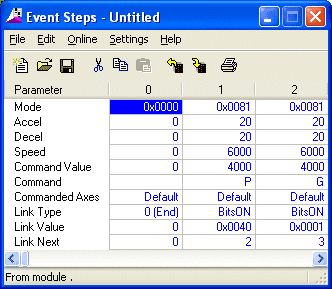
Event Control allows a sequence of commands to be executed by the RMC100, resulting in easy programming and quick response to system events. RMCWin provides efficient spreadsheet style editing of up to 256 steps in the Event Steps Table.
Curve Tool
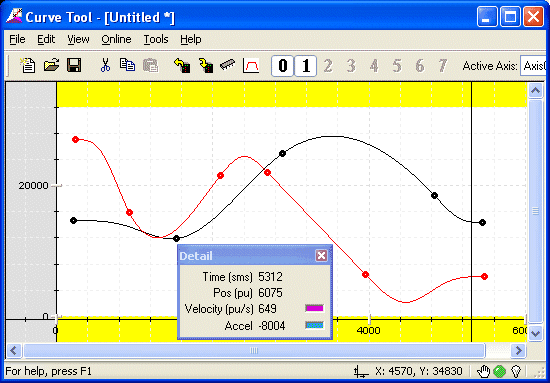
Like many other RMCWin features, the Curve Tool simplifies an otherwise complex task. Splines for intricate moves or camming can easily be designed in RMCWin and downloaded to the RMC100.
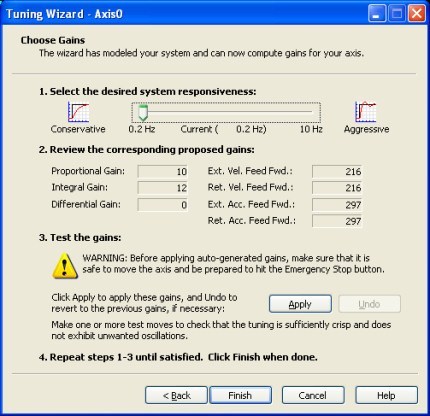
Tuning Wizard
The Tuning Wizard helps select appropriate gains for a position axis. It guides the user to easily import axis data and to set the desired system response between "conservative and aggressive" using a single slider bar so it can compute the optimum PID and feed forward gains.
- Provides an immediate and comprehensive overview of the status and current settings of up to 8 axes of motion control.
- Commands can be issued from the main screen to exercise any of the many features of the RMC100.
- Automatically started by a move or at any time by a simple keystroke.
- RMCWin displays detailed plots of moves, along with all status and motion parameters.
- Event Control allows a sequence of commands to be executed by the RMC100, providing easy programming and quick response to system events.
- Efficient spreadsheet style editing of up to 256 steps in the Event Steps Table.
- The Curve Tool simplifies an otherwise complex task. Splines for intricate moves or camming can easily be designed
- Start with simple moves and change control parameters from a keyboard
- Utilities calculate SCALE, OFFSET, and DIRECTION motion control parameters
- Auto feed forward adjust function
- Context-sensitive help
Windows 98, ME, NT4, 2000, XP, Vista, 7, 8, 10 or 11
Windows NT 4 requires SP6 and IE 4.0 or later.
8MB RAM
20MB Hard Disk Space